Technical SEO is the set of fixes that lets Google find your pages, read them and keep them in its index. For a small business site, eight checks cover the basics. Do them in the order below, then go back to writing pages that bring in calls.
We run this checklist as the first part of our SEO and AEO work for field service and SaaS businesses. You can run it yourself with free tools.
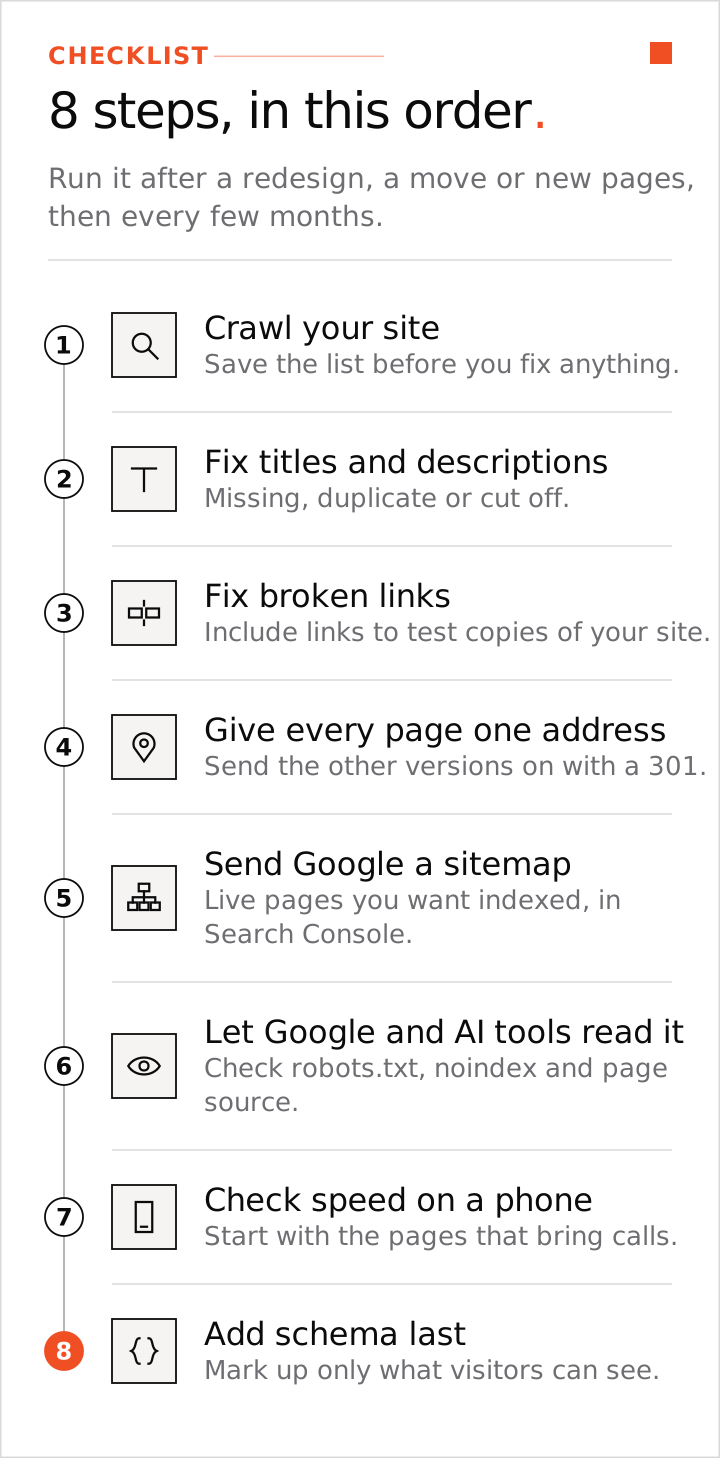
Step 1: Crawl your site and save the list
You need Google Search Console and a crawler. For a quick first read of one page, run our free website SEO checker. Search Console shows what Google can and cannot index. A crawler visits your pages the way Google does and lists every problem. The free version of Screaming Frog crawls up to 500 pages, and a site with one page per service and per area usually sits well under that.
Run the crawler on your home page address. Export the list with each page's title, description, status code and links. Save a copy before you fix anything, so you can compare after.
Step 2: Fix missing and duplicate titles and descriptions
Fix these first. They are quick, and they change what people see in the results. Sort the crawl by title. Fix every page with no title, every pair of pages with the same title, and every title that gets cut off. Put the service and the place in the first 50 to 60 characters, and your business name last.
Write a description for each page that says what it offers and what happens next. AI can draft them. A person should read every one. The full method is in our on-page SEO checklist.
Step 3: Fix broken links and links to test copies
Filter the crawl for pages that return a 404 (not found). Find the links that point to them and fix or remove those links. Also look for links that point to a test copy of your site. This happens often when a developer or an AI site builder made the site.
Then make sure the test copy is closed to Google. It should ask for a password or carry a noindex tag. If Google indexes a test copy, the copy competes with your real site.
Step 4: Give every page one address
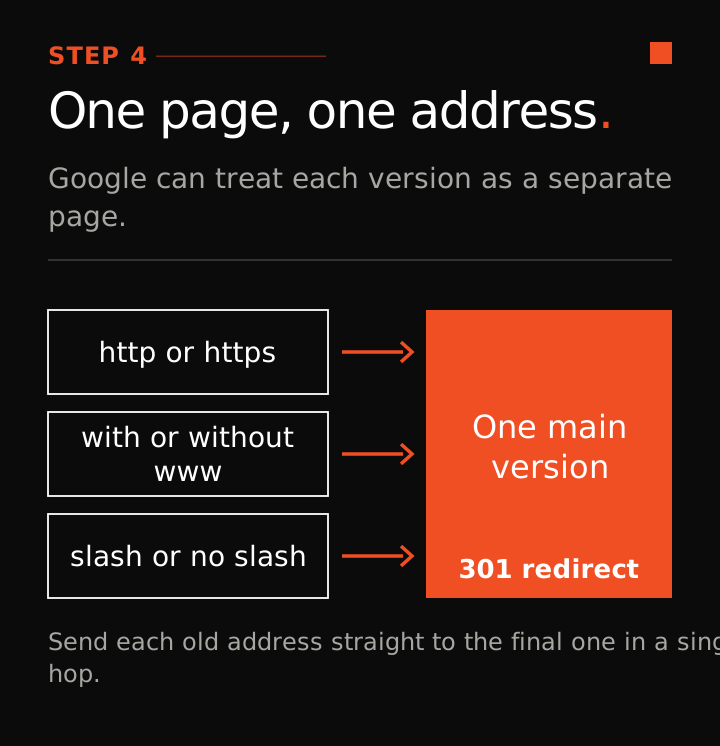
One page can have several addresses: http and https, with www and without, with a slash at the end and without. Google can treat each one as a separate page. Pick one version and send the others to it with a 301 redirect, the permanent kind. Send each old address straight to the final one in a single hop, never through a chain.
Check that each page names itself as the main version with a canonical tag. When you delete a page, it should return a 404 or 410, or redirect to the closest real page. It should never show a "page not found" message with a 200 (OK) status.
Step 5: Send Google a sitemap
A sitemap is a list of the pages you want in Google. Most site platforms make one at /sitemap.xml or /sitemap-index.xml. It should list only live pages you want indexed, and it should update when you add or remove a page.
Submit it in Search Console under Sitemaps. About a week later, open the Pages report and read why any page is not indexed. If a new page is slow to appear, add links to it from a few related pages. Skip paid indexing services. Many pages stuck in "Crawled, currently not indexed" usually point to thin or duplicate pages, so fix or merge the pages themselves.
Step 6: Make sure Google and AI tools can read each page
- Open yoursite.com/robots.txt. A line that says Disallow: / under User-agent: * blocks the whole site. Googlebot and OAI-SearchBot (the crawler behind ChatGPT search) should not be blocked.
- Check your money pages for a stray noindex tag. Plugins and site builders add them by accident.
- If you use Cloudflare or a host firewall, check that it lets Googlebot through.
- View the page source (right click, View page source). Your phone number, service names, prices and area should be there as text. Text that appears only after a click, only from a script, or only inside an image may not be read. Prices and FAQ answers should be in the page source, even when they sit in an accordion or tab.
AI answer tools read your pages too. Our AEO vs SEO vs GEO guide shows what they named when we asked for local trades in 20 US cities.
Step 7: Check speed on a phone, on your money pages only
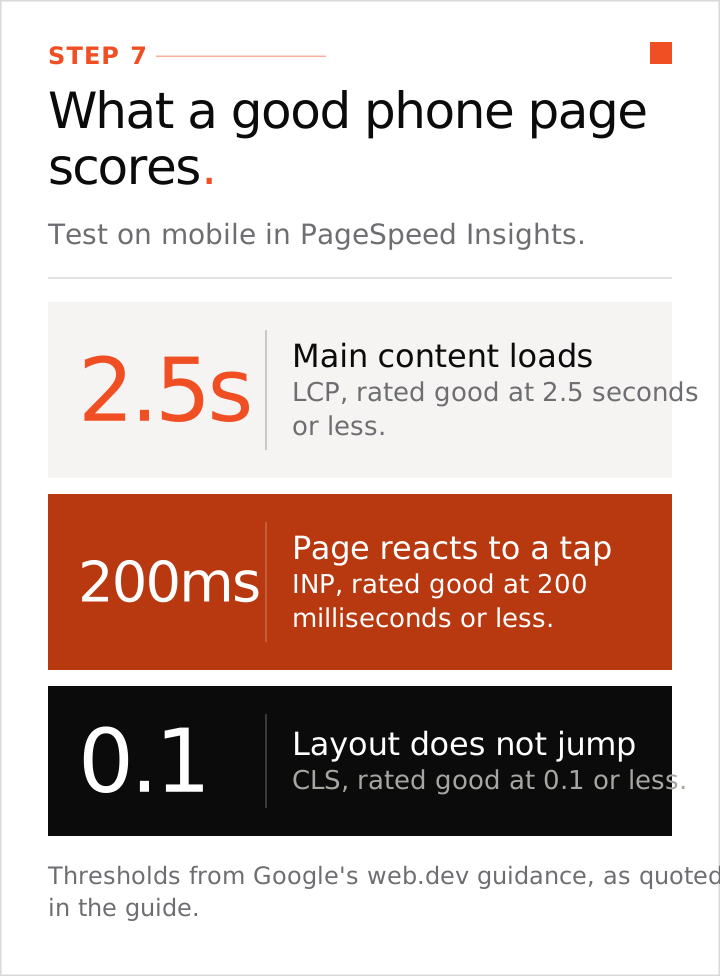
Test your service pages in Google's PageSpeed Insights, on mobile. Google's web.dev guidance rates a page "good" when the main content loads in 2.5 seconds or less (LCP), the page reacts to a tap in 200 milliseconds or less (INP), and the layout does not jump (CLS of 0.1 or less).
Big images and heavy scripts are the usual cause. Compress photos, set their width and height, and load the top image straight away. Remove chat widgets and pop-ups you do not need. Pop-ups that cover the page on a phone annoy visitors, and Google dislikes them too. A perfect score is not the goal. Fix the pages rated poor, starting with the ones that bring calls.
Step 8: Add schema last
Schema is code that tells machines the facts on a page: your business name, phone, address or service area, and the service. Add LocalBusiness (or the closest type, such as Plumber) to the home page and Service to each service page. Mark up only what the visitor can see, and match your Google Business Profile.
Skip star ratings for your own business, because Google does not show stars for a business that reviews itself. Schema helps machines read your page. It does not lift your rankings by itself. Test it with Google's Rich Results Test.
How often should you repeat this?
Run it after a redesign, a move or a batch of new pages, then every few months. A small site of 20 to 40 pages takes minutes to recheck once the first pass is done.
What we did on our own site
We did four of these on pallidan.com. The www address redirects to the main address, every page uses one slash style, the site carries schema, and the sitemap is in Search Console. Technical SEO is also one of the steps in AI SEO case study: $0 to $10,000 a month in 3 months.
Technical fixes make your pages eligible. They do not rank a page by themselves. Next, make sure each page matches what people search, with our local keyword research guide. Running a local business? Work through our local SEO checklist next.
What can wait
- Chasing a score of 100 on a speed test.
- Paying for a report with 200 items before the eight steps above are done.
- Schema for every type on the list.
- The meta keywords tag. Google does not use it.