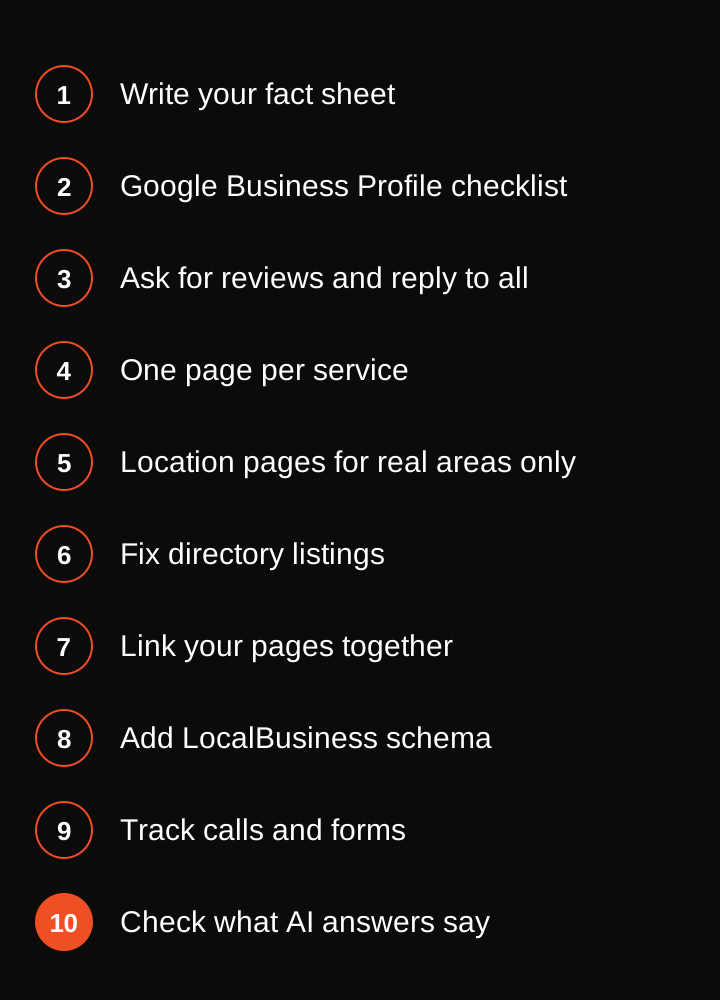
Local SEO is the work that gets your business found when someone nearby searches for what you do, like "plumber near me" or "roof repair in Tampa". This checklist covers 10 steps for service businesses: your business facts, Google Business Profile, reviews, service and location pages, listings, internal links, schema, tracking and AI answers. Do them in order, and tick each one off.
It is written for field service and home service businesses: plumbers, HVAC, roofers, electricians and similar trades. We run these same steps as part of our SEO and AEO work for field service and SaaS businesses. You can do all of them yourself. Trade specific versions: electrician SEO, HVAC SEO and SEO for contractors.
Step 1: Write your fact sheet
Open a document and write down the facts about your business. One business name, spelled the same way every time. One address, or one service area if customers never visit you. One phone number. Your opening hours, your main website address and a short list of the services you sell.
Every other step uses this sheet. Google trusts a business more when the details match across your website, your Google Business Profile and the directories. Different names or numbers in different places make it harder for Google to be sure it is the same business.
Step 2: Google Business Profile checklist
Your Google Business Profile is the listing that shows on Google Maps and in the map results at the top of a local search. For most service businesses it brings more calls than the website does, so it comes early. Go through this list:
- Pick the primary category that matches the job you most want calls for. A roofer picks a roofing category, not a general contractor one. Add secondary categories only for work you really do.
- Add your services, one by one, using the words customers use.
- Set your hours, including holiday hours.
- Set your service area if you travel to customers. Hide your home address if customers never visit you.
- Add one phone number, the same one as your fact sheet, and your website address.
- Upload real photos: your team, your trucks, your finished jobs. Add new ones now and then.
- Write a short description of what you do and where.
Tip: never put a phone number, a web address or a price in a Google Business Profile post. Say what the post is about and let the profile buttons do the rest.
Step 3: Ask for reviews and reply to every one
Ask every customer for a review after the job is done, while they are still happy. Send a direct link to your review page by text. Make it a habit your team does after every job, not a push once a year.
Reply to every review, good or bad. Thank the happy ones by name. Answer the unhappy ones calmly, say what you will do about it and offer to fix it offline. Replies show new customers how you treat people.
Never buy reviews, and never ask only your happy customers for one (that is called review gating). Both break Google's rules, and they can cost you your listing.
Step 4: Build one page for each service you want calls for
Give each main service its own page on your website. "Water heater replacement" gets a page. "Drain cleaning" gets another. Do not squeeze every service onto one page called Services.
On each page, say what the job involves, what the customer can expect and how to get in touch. Put the service and your main area in the title and the first heading. Use your own photos. Our local keyword research guide shows how to find the words customers search for, and our on-page SEO checklist covers titles, headings and page structure.
Step 5: Add location pages only for areas you really serve
A location page makes sense when you serve that town and have done real jobs there. Write it about that place: the jobs you did, the neighborhoods you cover and what customers there ask about. Do not copy one page and swap the town name 50 times. Pages like that add little, and Google may ignore them.
If you have no real jobs in an area, leave it out. We wrote a full walk-through in our location pages guide.
Step 6: Fix your directory listings and citations
A citation is any place online that lists your business name, address and phone number. Examples are Apple Maps, Bing Places, Yelp, Facebook and trade directories. Copy your fact sheet into each one exactly. Search for your business name and phone number, and fix any old listing that shows a previous address or number.
Start with the big ones and your trade's own directories. Quality matters more than count. Ten correct listings beat a hundred messy ones.
Step 7: Link your pages to each other
Link from your home page to your main services. Link each service page to the related ones and to the places you serve. Link back to the service pages from your location pages. Use clear link text like "water heater replacement" instead of "click here".
Every page you want calls from should be reachable in a few clicks, and should have a few links pointing to it from your own site.
Step 8: Add LocalBusiness schema
Schema is a small block of code that tells Google plain facts about your page. For a local business, the LocalBusiness type lists your name, address or service area, phone number, hours and website. Use the details from your fact sheet and make sure they match what shows on the page.
Many website plugins add it for you. Test your page with Google's Rich Results Test and fix any error it shows. Our technical SEO checklist has the rest of the site health basics.
Step 9: Track your calls and form fills
Rankings are not the goal. Calls and booked jobs are. Set up tracking so you can see what is working:
- Use Google Search Console to see which searches show your site.
- Use Google Analytics to count form submissions and taps on your phone number.
- Use a call tracking number, or the call history in your Google Business Profile, to count phone calls.
- Ask every new customer how they found you, and write the answer down.
Check the numbers once a month. If you want a quick look at your site first, run it through our free website SEO checker.
Step 10: Check what AI answers say about you
More people now ask ChatGPT or Google AI Overviews for a local business instead of scrolling through results. Once a month, ask the questions your customers would ask, like "who is a good electrician in Austin" or "how much does a roof repair cost". Write down whether your business shows up and what the answer says about it.
If the answer is wrong, fix the source: your website, your Google Business Profile and your listings. Clear service pages, matching facts and real reviews all help. Read more in our guide to appearing in Google AI Overviews.
What can wait
- Buying links or lists of directory submissions. Fix the ten listings that matter first.
- Pages for towns you do not serve.
- Posting on your Google Business Profile every day. Real photos and reviews do more.
- Paying for tools before you have done the ten steps above.
If you would rather hand this over, see what local SEO costs. Our SEO and AEO setup is US$4,999 one off, then US$999 to US$2,999 or more a month depending on the work. For a figure based on your own business, try our free SEO cost calculator. We cannot promise rankings, and anyone who does is guessing.